If you’ve ever found yourself staring at a pile of faded receipts on the last day of the month, you know that "reimbursable expenses" are rarely as simple as they sound.
Between IRS compliance and the manual effort of tracking every dollar, it’s easy for these costs to become a silent drain on your cash flow.
This guide cuts through the noise to help you build an audit-proof system that pays your team back faster without the administrative headache.
What Are Reimbursable Expenses?
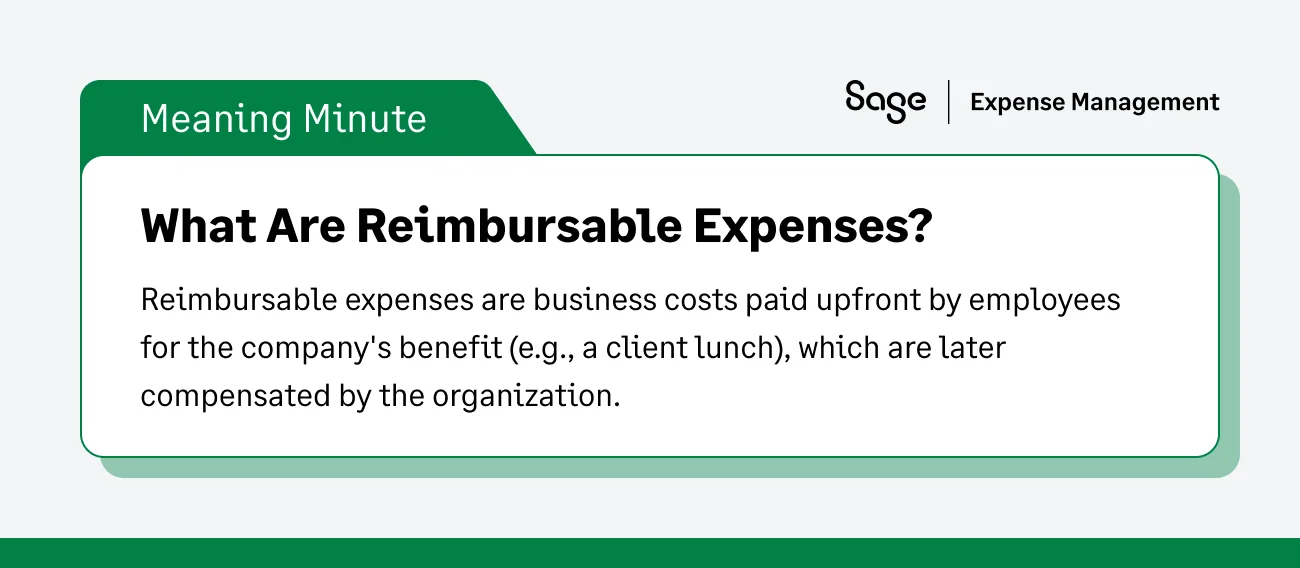
Reimbursable expenses are business costs paid upfront by employees for the company's benefit (e.g., a client lunch), which are later compensated by the organization.
Reimbursable expenses are costs that an individual (usually an employee) incurs on behalf of a business. Instead of using a company card, the individual pays out of their own pocket and is later compensated by the company.
To be considered "reimbursable" by the IRS, these must be ordinary and necessary expenditures directly related to your business operations. Think of them as a temporary, interest-free loan the employee provides to the company to keep things moving.
Differences Between Reimbursable And Non-Reimbursable Expenses
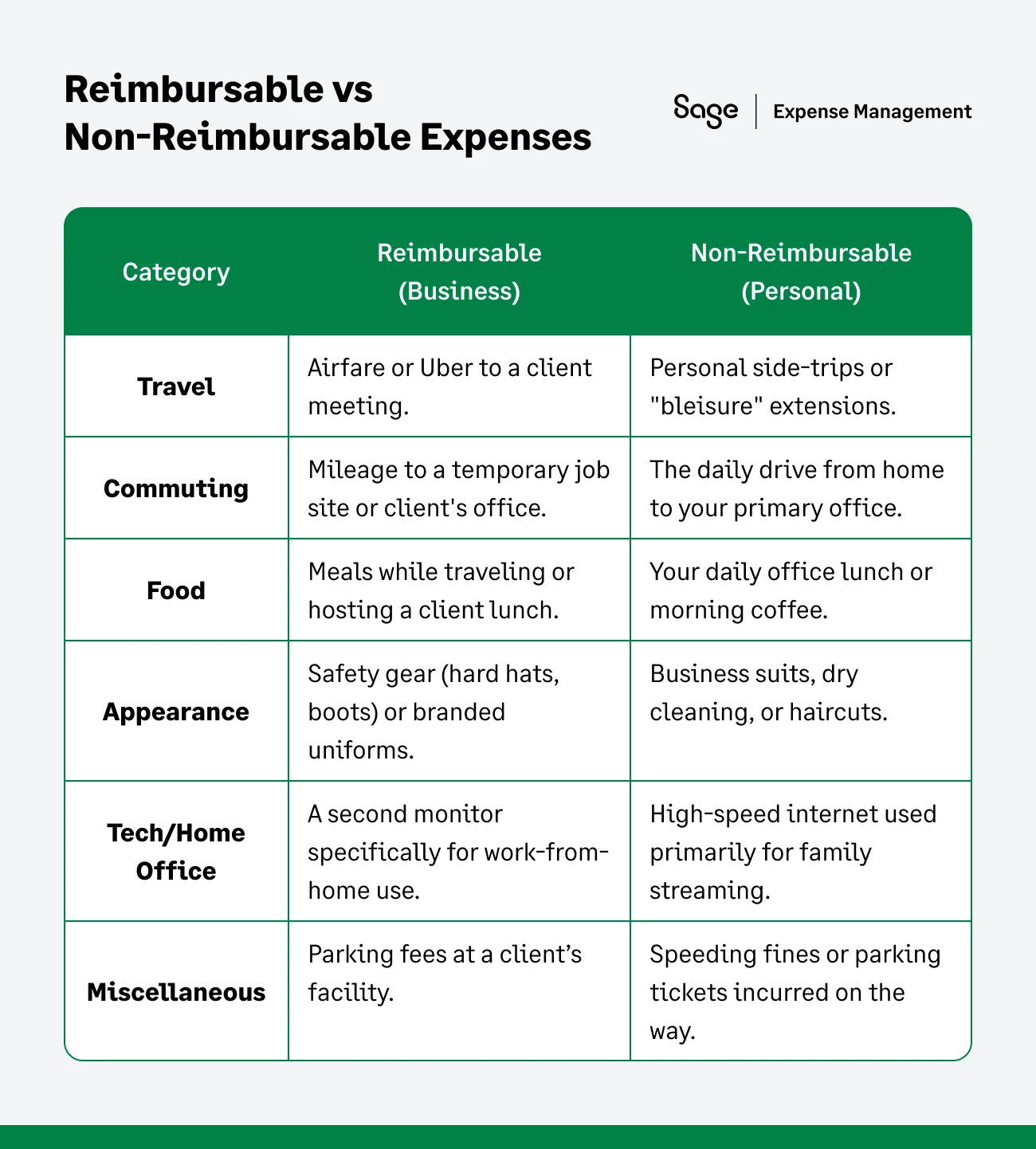
The primary distinction between these two categories comes down to the "Business Connection" rule. For an expense to be reimbursable, it must be "Ordinary and Necessary"—meaning it is common in your industry and helpful for your business to function.
While reimbursable expenses are essentially "temporary loans" from an employee to the company, non-reimbursable expenses are personal costs that the IRS (and your bottom line) expects the individual to cover.
The "Grey Area" Test: Is this Expense Reimbursable?
If you aren't sure whether an expense qualifies, ask yourself: "Would this expense exist if I weren't doing this specific work task?"
If an employee buys a $5 notebook to take notes during a specific project, it’s a Business Connection. If they buy a pack of pens for their home desk that their kids will also use, it falls into a Personal Usage bucket.
By providing a table like the one above in your employee handbook, you eliminate the "guessing game" and prevent friction during the approval process.
The "De Minimis" Rule: When is it Not Worth the Paperwork?
As a small business owner, you don't want your finance team to spend $75/hour to process a $2.00 receipt for a pack of gum. This is where the IRS "De Minimis" (Latin for "of minimum importance") rule comes in.
A de minimis fringe benefit is any property or service you provide to an employee that has so little value that accounting for it would be unreasonable or administratively impracticable.
Common examples of De Minimis expenses:
- Occasional snacks, coffee, or soft drinks provided to employees.
- Occasional tickets for theater or sporting events.
- Low-value holiday or birthday gifts (other than cash).
- Occasional meal money or transportation fare for employees working overtime.
The Golden Rule: The IRS does not set a specific dollar amount (like $25 or $50), but they emphasize frequency and value. If you give an employee $20 for lunch every single day, that is no longer de minimis—it’s a taxable benefit. However, if you buy the team pizza once a month for a deadline, it’s a tax-free de minimis expense.
Business Tip: Use this rule to simplify your policy. Tell employees that small, recurring personal items under a certain threshold (e.g., $5.00) shouldn't be submitted for reimbursement to keep your "Accountable Plan" from becoming a mountain of tiny receipts.
Reimbursable Expense Categories
1. Travel & Transportation
- The basics: Airfare, train tickets, and lodging.
- Mileage: Most small businesses use the IRS Standard Mileage Rate to compensate employees for using personal vehicles for business trips.
- Incidentals: Laundry or local transit (Ubers/Lyfts) while away from home.
2. Meals & Entertainment
- Client meals: Taking a prospect out for a business discussion (usually 50% deductible).
- Office perks: Occasional snacks or holiday parties (often 100% deductible).
- Entertainment note: Most "pure" entertainment (like golf or sporting events) is no longer deductible, even if you reimburse the employee.
3. Education, Training & Professional Development
- Tuition & books: Coursework directly related to the employee's current position.
- Certifications: Costs for obtaining licenses or professional certifications required for the job.
- Memberships: Subscriptions to industry publications or professional association fees.
4. Technology & Remote Work
- Home office: Ergonomic furniture or monitors specifically for remote work.
- Mobile & internet: A portion of personal phone or home internet bills if used for significant business purposes.
Also Read
IRS Compliance: Accountable vs. Non-Accountable Plans
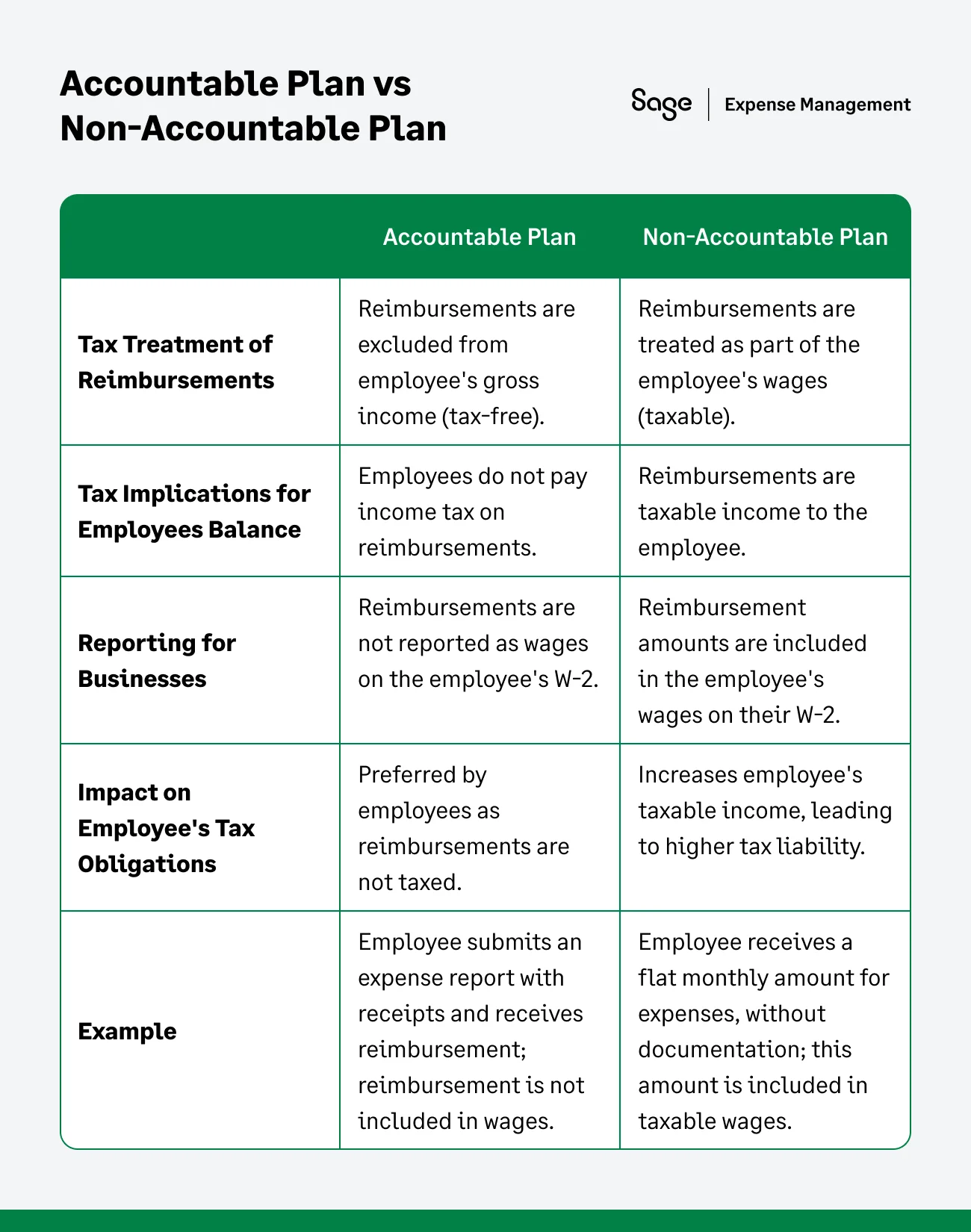
The IRS views money flowing from a company to an employee in one of two ways: it’s either wages (taxable) or a reimbursement (tax-free). How you structure your "plan"—the set of rules your business follows—dictates which category you fall into.
The Accountable Plan (The "Tax-Free" Shield)
An Accountable Plan is the gold standard for SMBs. It allows you to pay employees back for business expenses without those payments being counted as income.
To qualify as "Accountable," your process must strictly follow these three IRS pillars:
Pillar 1
Business Connection: You cannot reimburse an employee for a "nice to have" item. The expense must be ordinary (common in your trade) and necessary (helpful for your business).
Example: Reimbursing a sales rep for a client dinner is a business connection. Reimbursing them for their commute to the office is not.
Pillar 2
Adequate Substantiation: You cannot take an employee’s word for it. They must provide "substantiation"—usually a receipt or a digital log—that shows the amount, time, place, and business purpose.
The "60-Day Rule": The IRS expects employees to submit these receipts within a "reasonable" timeframe, which they generally define as 60 days from the date the expense was incurred.
Pillar 3
Returning Excess Funds: If you give an employee a travel advance (e.g., $500 for a trip) and they only spend $400, they must return the extra $100.
The "120-Day Rule": Any excess money must be returned to the company within 120 days. If they keep it, that $100 officially becomes taxable wages.
Main benefit of an Accountable Plan: The money you pay back is not reported on the employee's W-2. You don't pay employer payroll taxes (FICA), and the employee doesn't pay income tax on it. It’s a win-win.
The Non-Accountable Plan (The "Tax Trap")
A Non-Accountable Plan is what happens when you decide to "keep it simple" by giving employees a flat allowance without requiring receipts.
Common examples of a Non-Accountable Plan:
- Giving a manager a flat $400/month "car allowance" with no mileage log.
- Giving a remote worker a $100/month "stipend" for home office costs without seeing a bill.
- Accepting "summaries" of expenses without actual receipts attached.
The Consequence: Because there is no proof of a business connection, the IRS treats these payments as supplemental wages. * For the Employee: This money is subject to income tax withholding. That $400 car allowance might only feel like $280 after taxes.
For the Employer: You must pay your portion of FICA and unemployment taxes on these amounts. You are effectively paying a "tax penalty" for the convenience of not tracking receipts.
Which One Should an SMB Choose?
Almost every small business should aim for an Accountable Plan. While it requires more "paperwork" (tracking receipts and checking dates), the tax savings for both the business and the employee are significant.
The Sage Expense Management Advantage
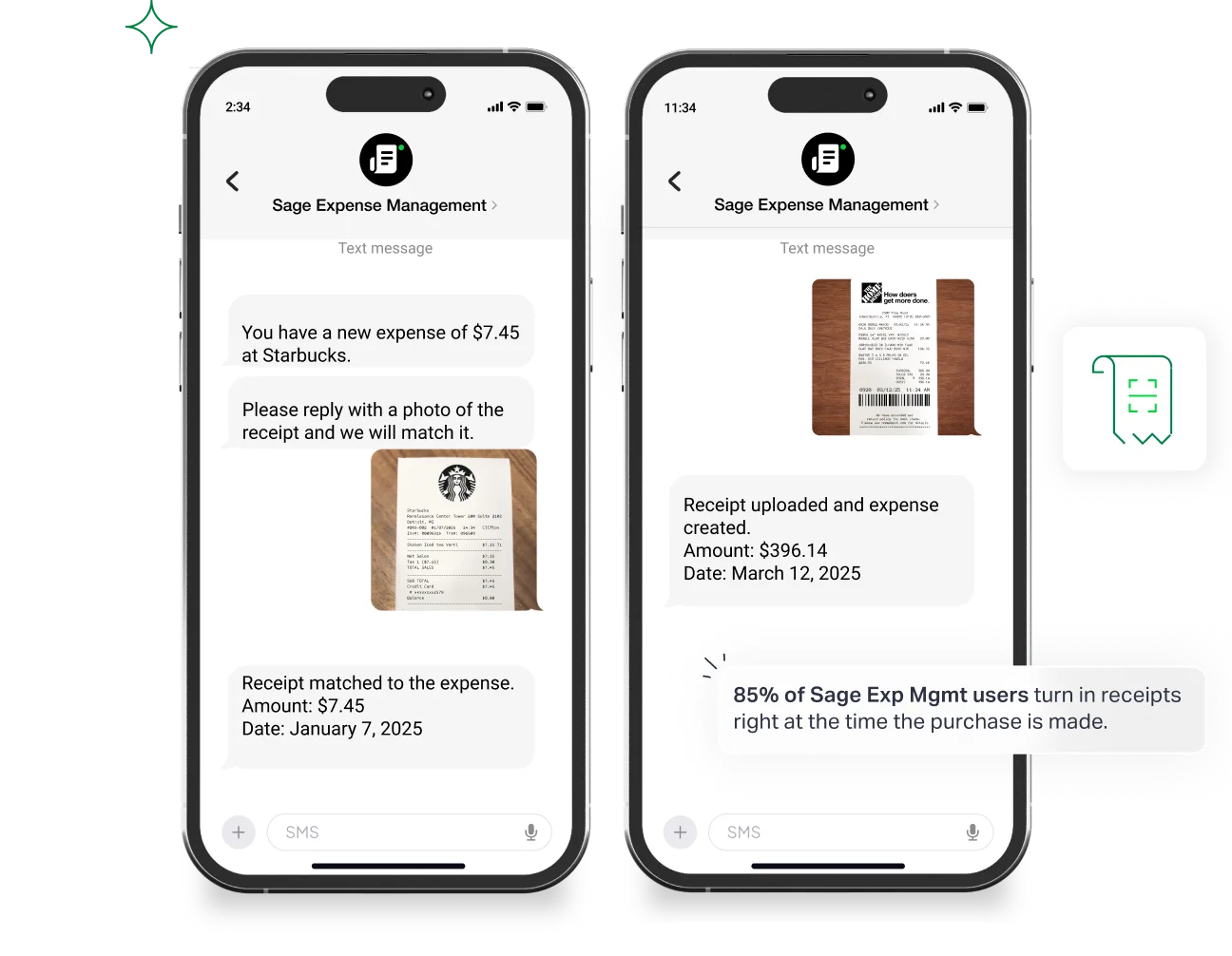
The biggest hurdle to an Accountable Plan is the "Substantiation" (collecting receipts).
Sage Expense Management automates this by letting employees text a photo of a receipt the moment they spend the money. This ensures you hit the 60-day window every time, keeping your plan "Accountable" and your payments tax-free without the manual chase.
How to Account For Reimbursable Expenses?
The goal of this workflow is to move an expense from an employee’s pocket into your General Ledger (GL) with zero data-entry errors.
1. Capture: The "Point-of-Sale" Rule
The biggest risk to a small business is the "lost receipt." When a receipt is lost, that tax deduction vanishes.
- The process: Employees should use a mobile app to snap a photo of the receipt before they even leave the cash register.
- Why it matters: Digital images are now legally recognized by the IRS as "substantiation." You no longer need to keep a shoebox of fading thermal paper.
Pro tip: If the receipt is for a meal, have the employee write the "Business Purpose" (e.g., "Lunch with client Jane Doe") directly on the receipt before snapping the photo.
2. Coding: Translating Spending into Data
In accounting, "Coding" means assigning an expense to a specific "bucket" in your Chart of Accounts.
- The process: Every expense needs a Category (e.g., Office Supplies) and, for many SMBs, a Project/Job Code(e.g., The Aston Hotel Project).
- Why it matters: This allows you to see your "True Job Costing." If you don't code the wood purchased for Project A correctly, Project A might look more profitable than it actually is, while your overhead looks artificially high.
3. Approval: The Internal Control
This is your "Gatekeeper" step. You are verifying that the spend was actually authorized and within policy.
The Process: A manager or owner reviews the digital report. They check:
- Is the receipt attached?
- Does the amount match the entry?
- Is it a legitimate business expense?
Why it matters: This prevents "expense creep" and fraud. For an SMB, even a few "misc" charges a month can add up to thousands of dollars in wasted margin by year-end.
4. Reimbursement: ACH vs. Payroll
Once approved, you owe the employee money. How you pay them matters for your speed and their satisfaction.
- The process: You can add the reimbursement to their next paycheck (Payroll) or send it immediately via ACH (Direct Deposit).
- Why it matters: Many SMBs prefer ACH because it keeps "reimbursements" separate from "wages." If it’s bundled in a paycheck, it can be confusing for the employee to see what was a bonus vs. a payback.
The Speed Factor: Using Express ACH ensures the employee isn't "floating" a business loan on their personal credit card for three weeks, which is a major boost for team morale.
5. Sync: Closing the Loop
This is the final "handshake" between your reimbursement tool and your accounting software (like QuickBooks or Sage Intacct).
- The process: Once the payment is marked as "paid," the data—including the digital receipt image—is pushed into your accounting system automatically.
- Why it matters: This eliminates the need for a bookkeeper to manually type in dates and amounts. It also means that if you are ever audited, you can click a transaction in your ledger and see the original receipt image instantly.
Are Reimbursed Expenses Taxable?
Short answer: No, provided you follow an Accountable Plan. However, if you pay a flat "monthly allowance" (e.g., $400 for a car) without requiring receipts, that is a Non-Accountable Plan and must be taxed as regular wages.
Should Reimbursed Expenses Be Included in 1099?
For independent contractors, if they provide a separate expense report with receipts under an Accountable Plan, you do not have to include those reimbursements in their 1099-NEC total. This helps them avoid "phantom income."
Improve How You Manage Reimbursable Expenses
Managing reimbursable expenses efficiently is crucial for maintaining financial control and accuracy. Whether you're an individual seeking reimbursement for work-related expenses or a business owner responsible for overseeing expense management, implementing effective strategies can streamline the process and improve overall financial management.
Here are some tips and tricks to boost your reimbursable expenses management:
- Have a clear expense policy: Create a comprehensive expense policy that clearly outlines what expenses are eligible for reimbursement and the process for submitting reimbursement requests.
- Use Expense Categories: Categorize expenses based on different types, such as travel, meals, supplies, or client-related expenses.
- Set Up Approval Workflows: Establish clear approval workflows for reimbursable expenses to ensure proper review and authorization before reimbursement.
- Encourage Timely Expense Submission: Emphasize the importance of submitting expense reports on time.
- Harness The Power Of Expense Allocation: Implement a system for allocating expenses to specific projects, clients, or departments.
Track Reimbursable Expenses Easily With Sage Expense Management
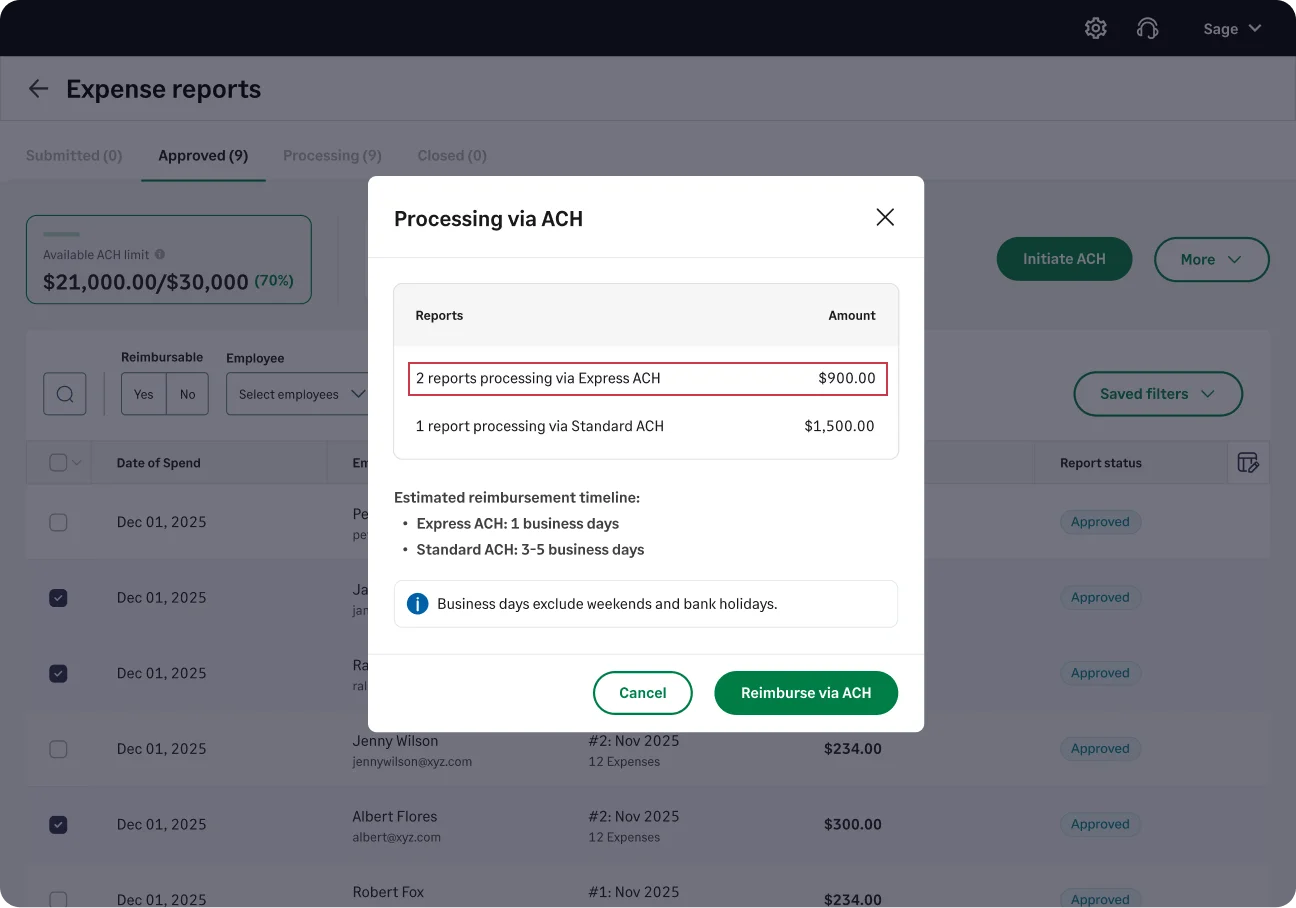
Skip the manual work and the paper chase. Sage Expense Management (formerly Fyle) automates the entire loop:
- Text-to-submit: Employees just text a photo of their receipt. Our AI extracts the merchant, date, and amount instantly.
- Real-time visibility: See exactly how much you owe in reimbursements before the month-end bill arrives.
- Express ACH: Don't make your team wait for a check. Reimburse them directly to their bank account in 1-2 business days.
- One-click sync: Automatically push all coded expenses into your accounting system—no manual data entry required.
{{reimbursement="/cta-banners"}}