Most finance teams start with spreadsheets, due to familiarity, flexibility, and the concept of them being “free”. As the company is on a smaller scale, using either Excel or Google Sheets works just fine.
But as the business scales, that "free" tool becomes a massive hidden cost center. We call this The Spreadsheet Tax.
This tax costs you, but you only realize this when it becomes a full-blown operational bottleneck where high-value finance talent is wasting hours on data entry rather than strategy.
If you are reading this, you likely already feel the pain.
The challenge isn’t knowing that you need to change; it’s proving to your leadership that the change is worth the investment. In this article, we help to identify the inefficiencies, quantify the losses, and build an irrefutable business case for automating expense management.
The Problem with Spreadsheets
Spreadsheets are static tools trying to manage dynamic spending. When you rely on them, you introduce four major risks to your organization:
Hidden inefficiencies and the chasing game
The sheer number of hours finance teams spend chasing employees for receipts is staggering. In a manual workflow, you aren't just processing data; you are acting as a receipt detective.
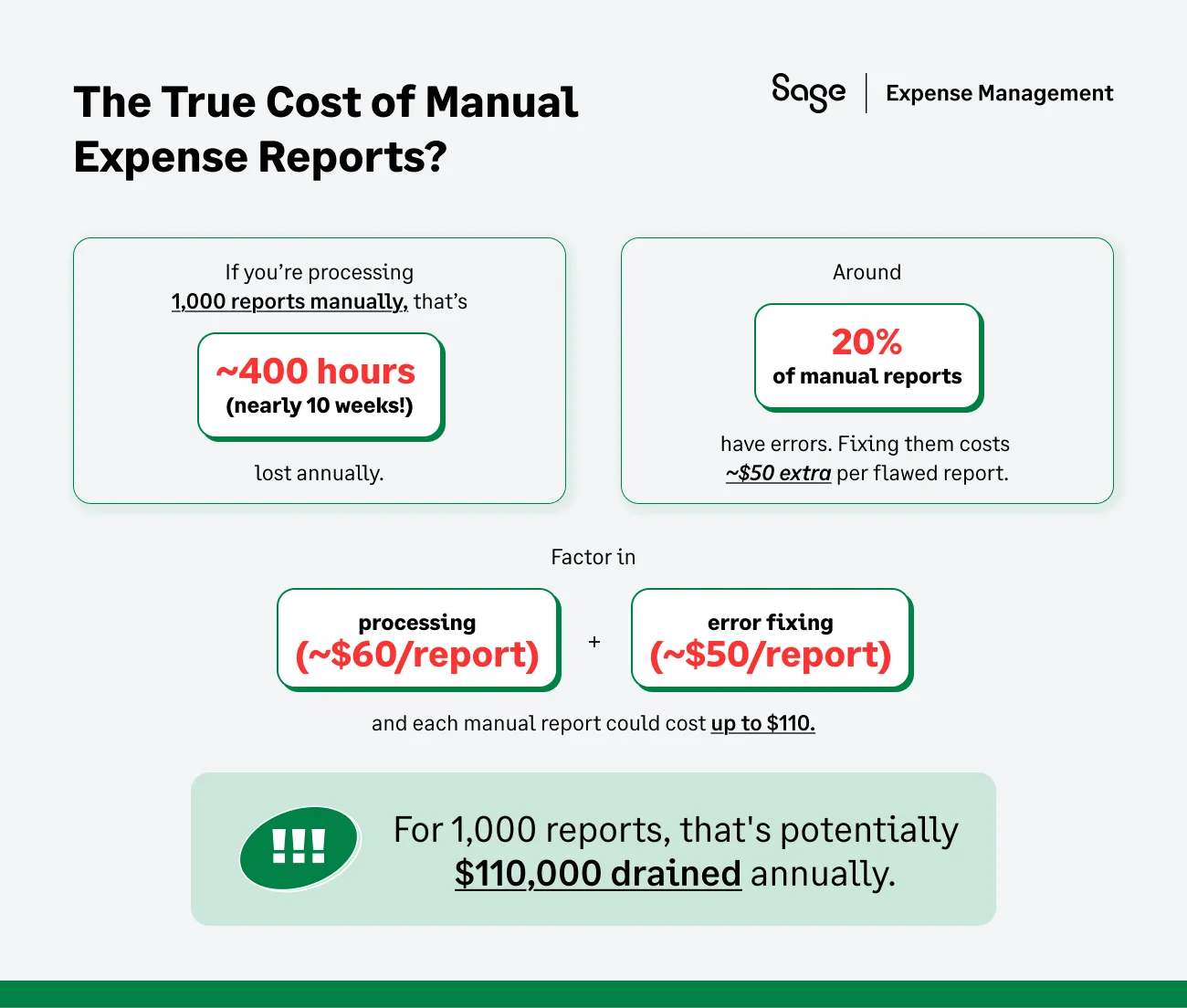
- The Cost: According to the Global Business Travel Association (GBTA), the average cost to process a single manual expense report is $58.
- The Reality: If your company processes 100 reports a month, you are burning close to $69,600 annually just on processing costs [this doesn’t include the actual reimbursement of spending]
Data integrity and rework
Manual data entry is the enemy of accuracy. A study found that 19% of expense reports contain errors.
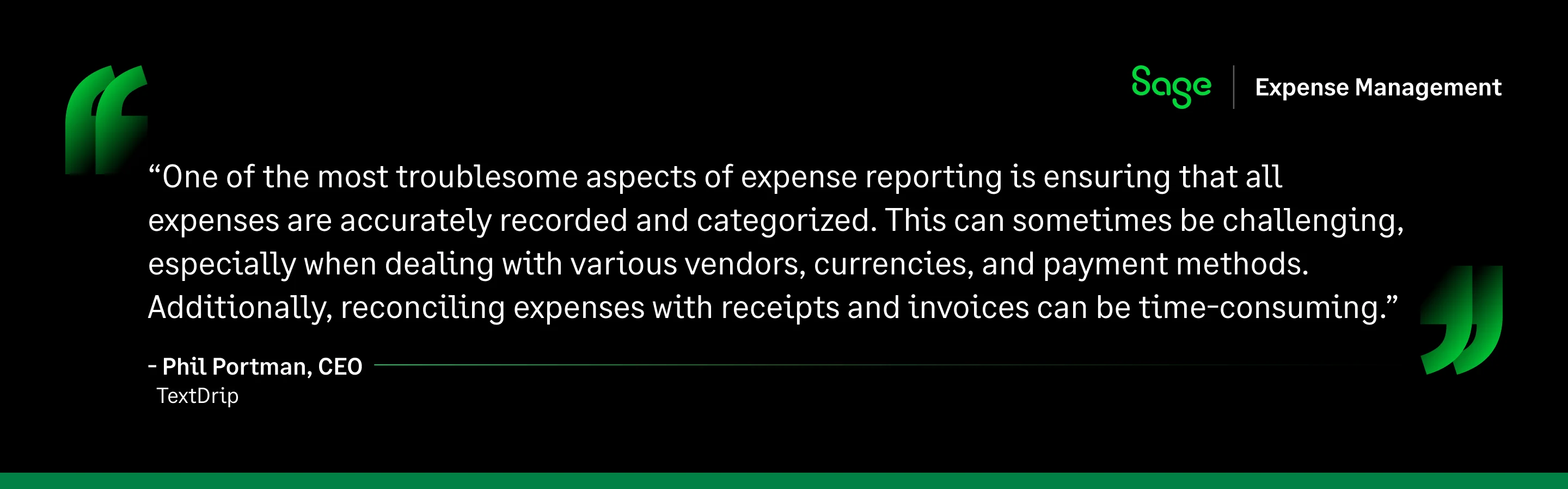
- Whether it is an error on a tip amount or a duplicate entry for a client's dinner, every error requires the finance team to kick the report back, wait for a correction, and review it again.
- The Result? Correcting a single erroneous report costs a time sink of an average of 18 minutes.
Compliance and audit exposure
This is where the spreadsheet method becomes dangerous. Under IRS Publication 535, businesses can only deduct expenses that are ordinary and necessary. But simply claiming them on a tax return isn't enough; you have to prove them. IRS Publication 463 outlines strict recordkeeping rules that most spreadsheet-based processes fail to meet.
- The trap of the $75 rule
There is a common misconception that expenses under $75 don't require documentation. While the IRS may not demand a receipt for these small amounts, you are still legally required to document the time, place, and business purpose for every single transaction.
- The spreadsheet gap
Spreadsheets allow users to type in a dollar amount without forcing them to justify the business purpose or attach a file. When you have the transaction data in Excel, but the receipt is rotting in a shoebox or lost in a random Google Drive folder, you have broken the audit trail.
- The consequence
In an audit, the IRS doesn't just look for totals; they look for the link between the expense and the proof. If you cannot produce the supporting documentation linked to the specific transaction line item, those deductions can be disallowed immediately. This leads to back taxes, penalties, and a heightened risk of future audits.
Limited visibility
Spreadsheets are known to make you look in the rear-view mirror at all times. By the time an expense report lands on your desk, the money was spent 30 to 60 days ago. You cannot control budget overruns if you only see it two months after it happened.
Why Do Businesses Require Automation Now?
But why stop using spreadsheets today? Why not wait until next year? Here’s why:
The transaction volume tipping point
As you add more employees and issue more corporate cards, the manual burden doesn't grow linearly; it grows exponentially. Reconciling 50 transactions takes an hour; reconciling 500 takes a week. Automation creates a scalable process that handles 50, 500, or 5,000 transactions with the same effort.
Operational risk and audit readiness
IRS audits often trigger a need for migration to an expense management software. However, the best time to switch is before the audit letter arrives. Automation ensures that every transaction is captured with the necessary metadata (date, merchant, amount, business purpose) required by the IRS, keeping you audit-ready 24/7.
The strategic shift
The focus across industries is rapidly shifting from data entry to data insight. You cannot be a strategic partner to the CEO if you are buried in Excel formulas. Automation frees you to analyze spend patterns rather than recording them.
{{business-expenses="/cta-banners"}}
Building Your Business Case: A Step-by-Step Blueprint
Now that you realize the urgency of an expense management software, to get a buy-in, you cannot simply say, spreadsheets are annoying. You must prove that the current manual process is a liability, and that automation is a strategic asset.
Below you will see how to map the solution to the specific maturity stage of your company and the unique pain points of your stakeholders.
Tailor by company size: The right-sized argument
The argument that wins over a small business owner is different from the one that convinces a mid-market CFO. To build a successful business case, you must identify where your organization sits on the maturity curve and solve that specific pain.
1. Small businesses
You are likely operating with a founder-approver model where the CEO or a lone finance lead manually reviews every single transaction.
The pain points?
- Valuable hours are lost to data entry rather than strategic cash flow analysis. You are paying high-value staff to do low-value typing.
- Without a system, money is wasted on forgotten subscriptions and duplicate charges that go unnoticed until months later.
- You face high potential for lost deductions. If receipts are missing, you fail IRS recordkeeping requirements, meaning legitimate business expenses cannot be claimed.
So, how does automation help?
- Instant Capture: Employees text receipts the second they spend. No more chasing paper or shoebox accounting.
- Zero Data Entry: The expense management software extracts the data automatically from the receipt, making manual work negligible.
- Deduction Protection: Automation automatically secures valid proof of purchase to meet IRS standards, ensuring you never leave tax savings on the table.
- Strategic Focus: It frees up employee time to focus on growth and strategy rather than administrative grunt work.
2. Mid-market companies
In mid-market companies, you have layers of management, multiple corporate card programs, and a finance team that is disconnected from the day-to-day spenders.
The pain points:
- The month-end close drags on because finance/accounting teams are waiting for credit card statements to reconcile.
- Spreadsheets fail to catch subtle violations. Users might sneak in flight upgrades or exceed limits because manual reviewers can't catch everything.
- Multiple credit card programs create data silos, making it impossible to see a unified view of company spending.
- Manual processes struggle to maintain a consistent audit trail across hundreds of transactions, leaving you vulnerable during an audit.
So, how does automation help?
- Automated Hierarchies: It enforces multi-level approval workflows, so managers vet spend before it goes further.
- Continuous Closing: Real-time transaction feeds allow for daily reconciliation, cutting the closing time from weeks to days.
- GL Precision: Automates general ledger coding and mapping before data hits the ERP, ensuring your books are clean.
- Proactive Compliance: Flags out-of-policy spend instantly, preventing violations at the source rather than just catching them later.
Define Cross-Functional Impact: What's in It for Me?
A business case fails when it looks like a financial project. You must sell this as an operational upgrade for the entire company.
For finance teams
- The shift: Stop spending days emailing employees with subject lines like "Missing Receipt - Oct 14."
- The benefit: Automation enables a continuous close. It extracts real-time data from any transaction source such as a corporate credit card transaction and instantly matches it to the corresponding receipt submitted. This eliminates duplicate data entry, and eradicates any manual errors which distort your P&L.
For managers
- The shift: It’s the end of the week. A pile of expense reports are waiting to be processed. The result? Spreadsheets are approved hastily just to get the inbox to zero.
- The benefit: With the help of automation, approvals happen in the flow of work. The manager gets an email notification, sees the receipt and compliance violations instantly, and clicks "Approve" or "Send Back" in real-time. It turns a 2-hour chore into a 2-minute task.
For employees
- The shift: No more sticking thermal paper to A4 sheets or having anxiety about losing a receipt and paying out-of-pocket.
- The benefit: Text it and forget it. Employees can simply snap a photo of the receipt immediately after a client dinner. The expense management software extracts the data, checks the policy, and queues the reimbursement. This ensures payments in days, not weeks, improving morale.
For executives
- The shift: Moving from "What did we spend last month?" to "Where are we spending right now?"
- The benefit: Executives get a dashboard of insight into company spending as it happens. They can view if a department is trending over budget before the month ends, allowing for proactive adjustments rather than reactive autopsies.
Anticipate stakeholder resistance / Building the business case
When you present a business case for automation, you aren't just asking for a budget; you are asking for a change in behavior. Each stakeholder will view that change through a different lens of risk. Here is how to decode their hesitation and align your business case with their priorities.
The CFO
The challenge: CFOs are conditioned to reject soft savings. If you simply say, "It saves us time," they usually hear, "We are paying for a convenience tool." They worry that the time saved won't translate into money saved; it will just mean the finance team goes home 20 minutes earlier.
How to mitigate: Shift the conversation from "Time Saved" to "Capacity Reallocated."
- Quantify the waste: Use industry data ($58 per manual report) to show the hard cost of the status quo.
- Highlight opportunity cost: Explain how the 35 hours a month spent on manual entry is 35 hours stolen from higher-level tasks like forecasting, cash flow analysis, and vendor negotiation.
The operations team
The challenge: Operations leaders fear disruption. They are asking, "Is this going to be a six-month IT project that distracts us from our actual goals?" and "Will employees' revolt against learning a new system?" They view new software as potential friction that slows down the business.
How to mitigate: Emphasize on "Zero-Training Adoption."
- Speed to value: Highlight that because this is a cloud-native solution, there is no hardware to install, and implementation is measured in days, not months.
- Meet them where they are: Show them that employees don't need to learn a new dashboard. An expense management software workflow fits into the tools the team is already using, minimizing operational drag.
The risk officer
The challenge: Compliance officers know that spreadsheets are fragile. Their concern is the disconnect between the numbers on the spreadsheet and the actual receipts required by the IRS. They fear that in an audit; the beautiful Excel sheet will be worthless because the supporting evidence is missing or unlinked.
How to mitigate: Compare Fragile vs. Permanent Compliance.
- The digital chain of custody: Spreadsheets rely on human discipline, which fails. Automation relies on code, which doesn't.
- Automated enforcement: An expense management software enforces IRS rules (like business purpose and attendee lists) before a reimbursement can be processed. This creates an immutable digital record where every transaction is permanently linked to its receipt and approval timestamp, making the company audit-proof by default.
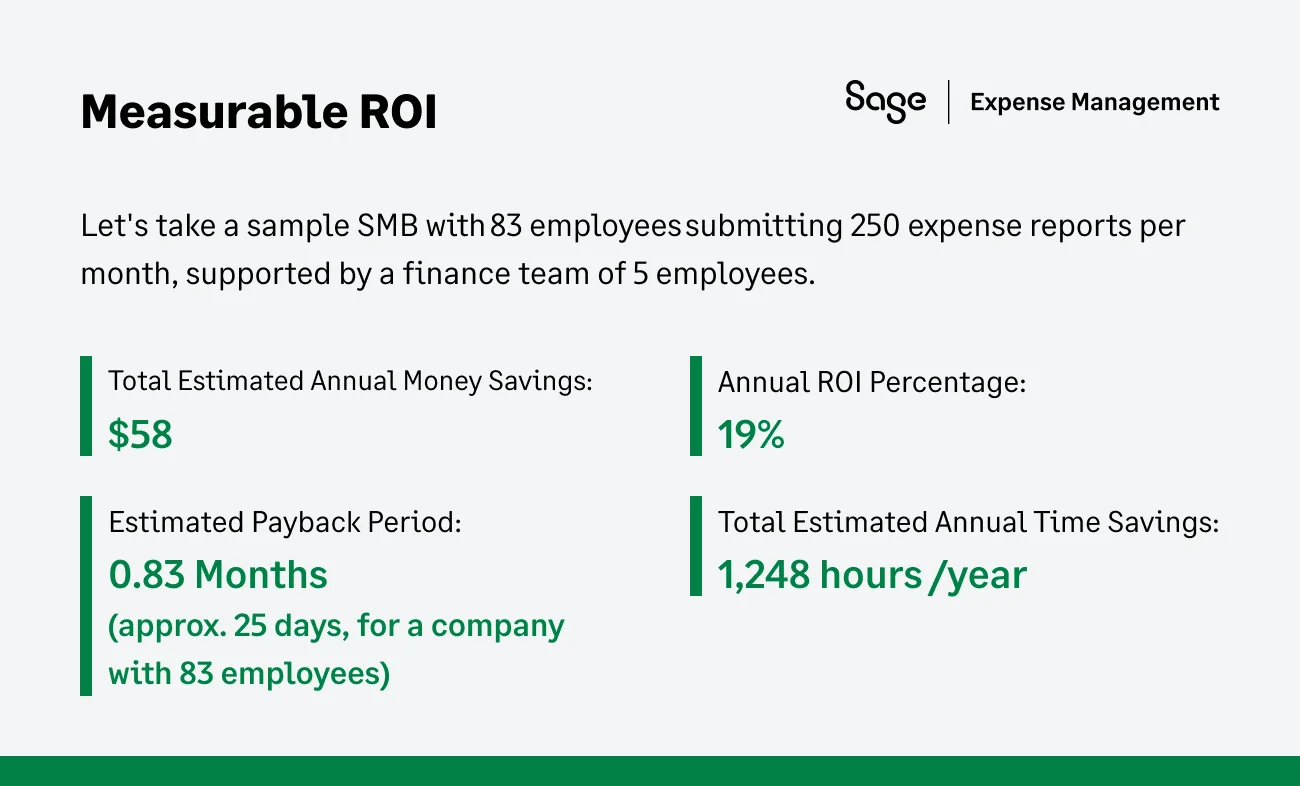
How Sage Expense Management Solves the Spreadsheet Tax
Sage expense management doesn't just digitize the spreadsheet; it fundamentally changes the physics of how money is tracked, approved, and reconciled. It moves finance teams from a reactive cleanup crew to a proactive strategic partner.
Real-time data
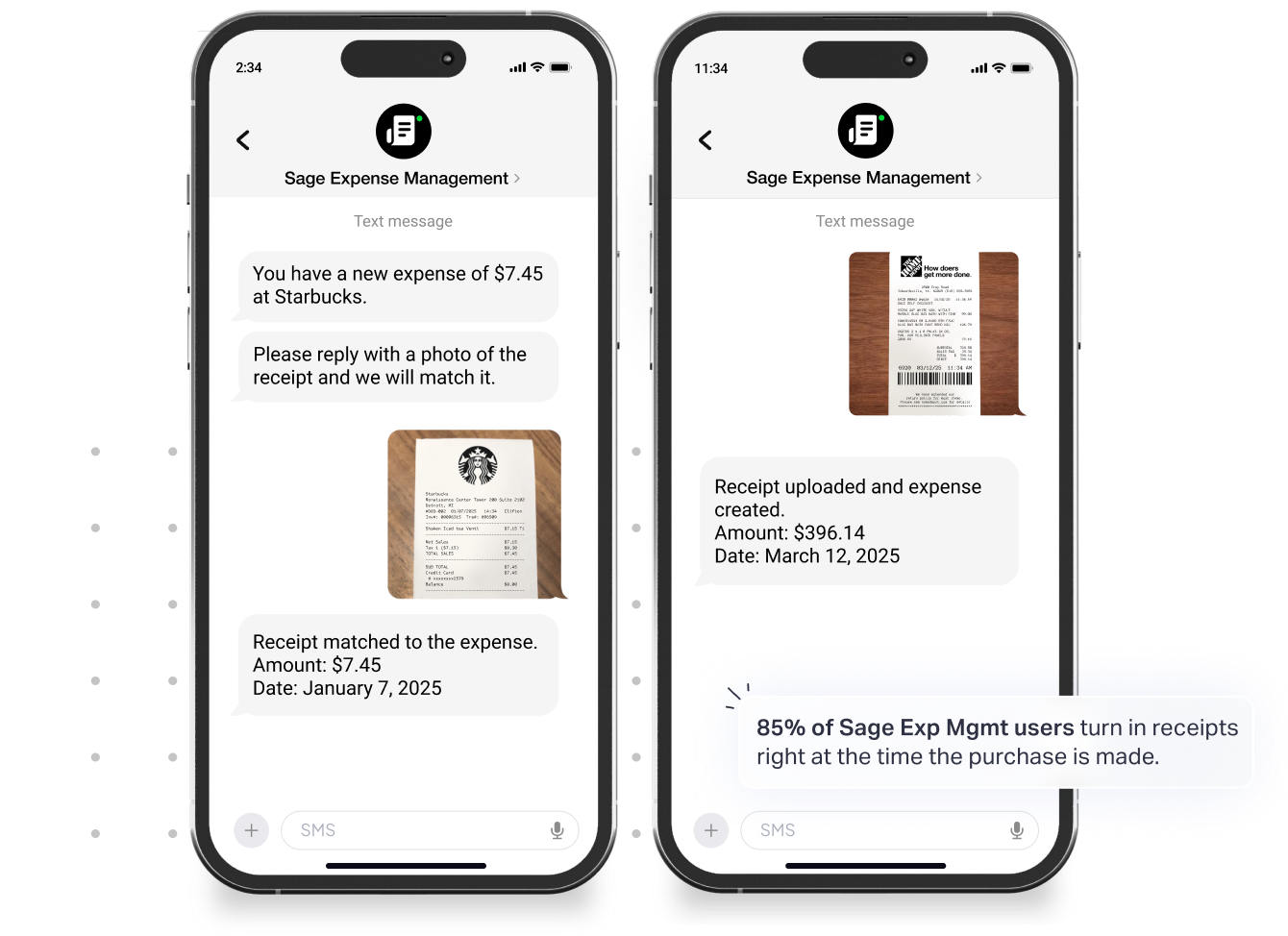
Unlike legacy bank feeds that trickle in 3–5 days after a purchase, Sage expense management leverages direct integrations with major credit card networks to offer real-time transaction feeds.
As soon as an employee swipes their card, they are prompted to submit a receipt via text. The software matches the image to the transaction line item automatically.
Reconciliation becomes a continuous, daily flow rather than a three-day nightmare at month-end.
Built-in audit compliance
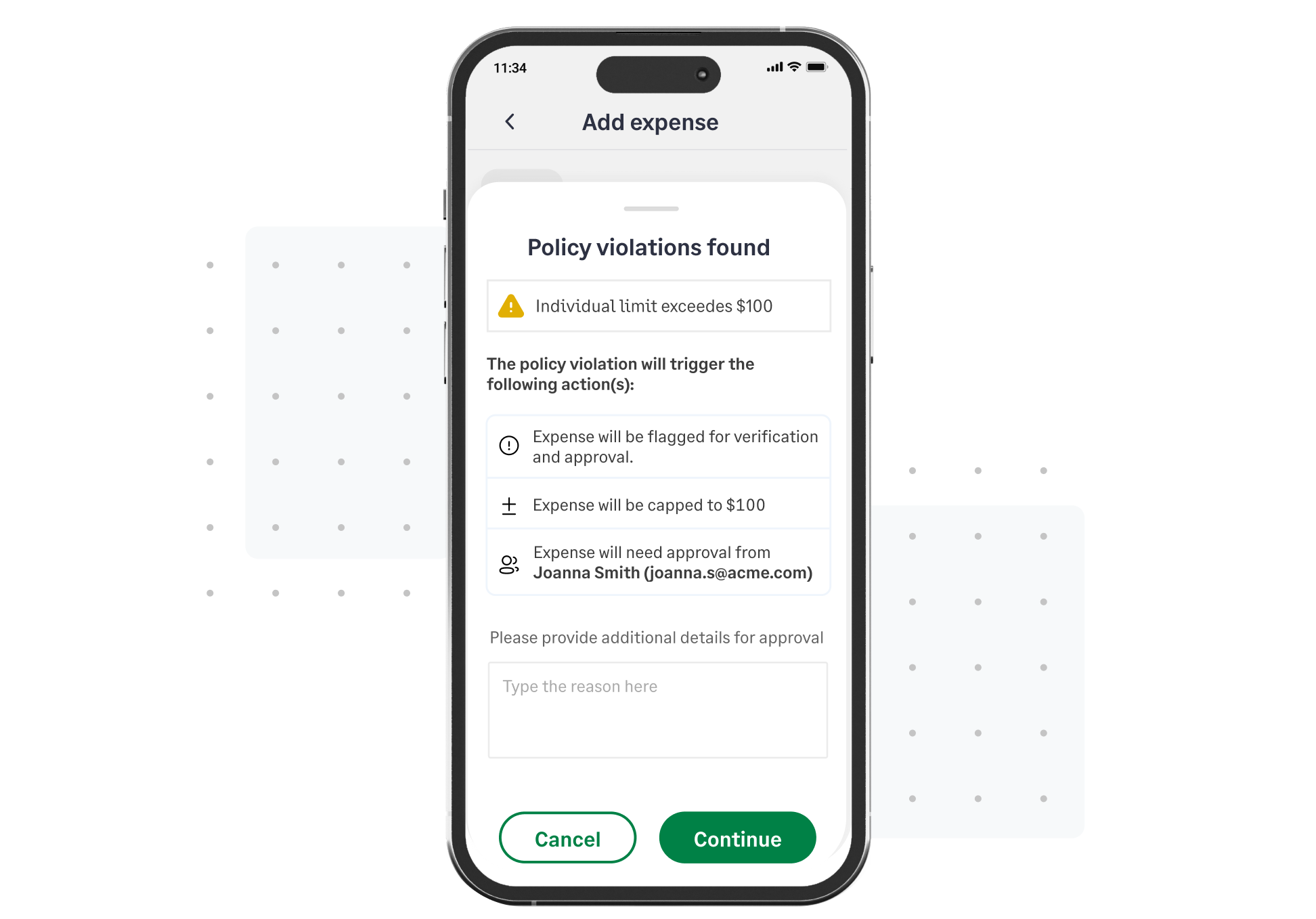
Sage expense management acts as an automated compliance officer that never sleeps and never plays favorites. While the IRS generally requires documentary evidence for expenses over $75, many companies set lower internal thresholds. The software enforces this by automatically blocking submissions if a receipt is missing for any transaction over your set limit.
Moreover, if an employee tries to submit an expense that violates your set rules, the system flags it immediately with a pop-up explaining why it’s out of policy.
Seamless accounting integrations
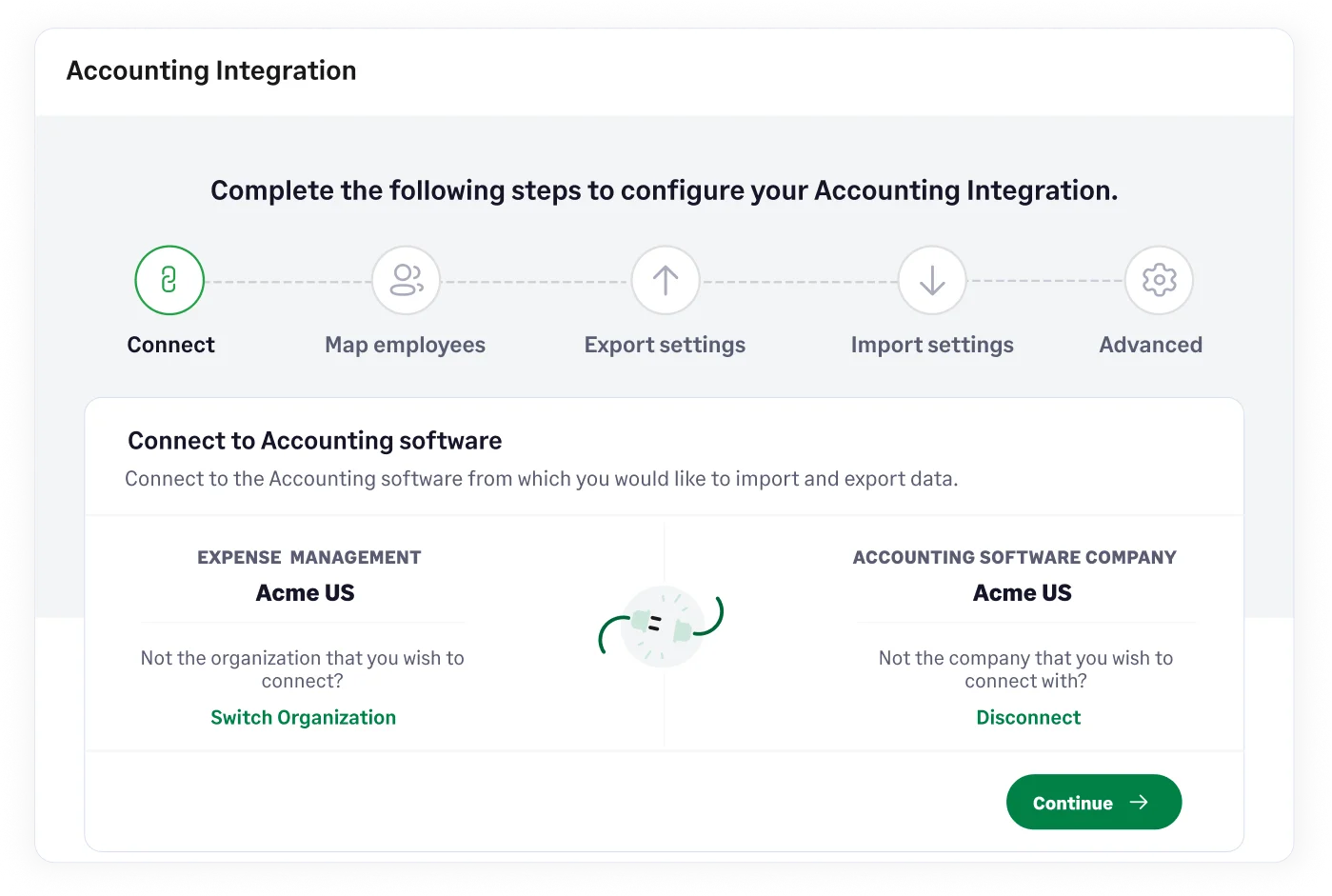
Spreadsheets are an island; Sage expense management builds bridges. It features deep, two-directional integrations with accounting software's such as Sage Intacct, QuickBooks Online, NetSuite, Xero, etc.
The system maps expenses to your specific General Ledger codes, Classes, Locations, and Projects. This eliminates the risk of manual data entry errors (e.g., typing $100 instead of $1000) and ensures your financial statements always reflect the exact reality of your spend.
Spreadsheets feel safe because they are familiar. But in reality, they are a liability. They hide costs, invite errors, and expose your business to compliance risks.
The business case is clear: The cost of staying manual measured in lost hours, high processing fees ($58/report), and audit risk far outweighs the investment in automation.
You have the data. You see the hidden costs. Now, it’s time to modernize.
{{reclaim-time-and-money="/cta-banners"}}
.jpg)