
Businesses today are flooded with expense management solutions promising to make their lives easier–and two popular names among them are Ramp and Expensify. They dangle shiny perks in front of you, like cashback, AI-powered savings, and sleek workflows. But what if we told you that these benefits came with a catch?
Both Ramp and Expensify require you to change how you operate, forcing you to adopt their proprietary cards to unlock full access to their software. If you’ve ever felt stuck managing your business’s finances, switching to tools that lock you into rigid systems might not be the savior you’d hoped for.
So, let’s dive into a side-by-side comparison of these tools–and along the way, you’ll see why businesses are moving away from these card-first models in favor of something more flexible.
Ramp: Savings Today, Headaches Tomorrow?
What Ramp promises
Ramp presents itself as a finance automation platform with built-in savings. The corporate charge card offers:
- AI-powered tools that catch duplicate expenses and find cheaper vendors.
- Up to 1.5% cashback and access to $350,000 worth of partner discounts with services like AWS and Slack.
- A no-fee structure–no interest rates, annual fees, or hidden charges.
Sounds great, right? But let’s pop that hood and take a closer look.
What users are actually saying
{{rve-1="/quote-banners"}}
Source: G2
Ramp’s floating credit limits–tied directly to the cash flow in your bank account–can disrupt your operations at the worst possible time. One day, your account looks healthy; the next, you’re stranded with no credit. As one user put it:
Several users have reported being stranded without warning, with their cards unexpectedly blocked–leaving teams unable to make crucial payments or complete transactions.
Imagine having a team on the road, only to discover your company card is suddenly declined. One user explained:
"We had a six-figure balance in our account, but our cards were blocked. Ramp’s team blamed it on risk management."
Even large cash outflows—like real estate purchases—can cause sudden disruptions, making it impossible to rely on Ramp’s card for operational expenses:
{{rve2="/quote-banners"}}
Source: G2
No rolling credit, No flexibility
Ramp’s cash-flow-based credit limits can leave businesses vulnerable, especially those that rely on credit cards for payroll or short-term expenses. While Ramp offers no preset spending limits, it functions as a charge card—not a credit card. And that’s an important distinction many businesses overlook.
Unlike traditional credit cards that let you carry a balance and pay over time, charge cards require you to pay the full balance each month, with the amount automatically deducted from your bank account. There's no flexibility to delay payment or spread it out across billing cycles—no matter how large the expense.
For startups and SMBs with fluctuating expenses, this rigid payback model can be a major challenge. Imagine facing a large software renewal or an unexpected marketing campaign—Ramp would require the total amount upfront, disrupting cash flow for other essential needs. As one user put it:
{{rve-3="/quote-banners"}}
Source: G2
Without the flexibility of rolling credit, Ramp’s strict payment model can hinder growth, leaving businesses struggling just when they need financial breathing room the most.
The underwriting trap
Ramp relies on automated cash-flow underwriting to determine your spending power. While this allows for a 15-minute signup process, it creates a "Floating Limit" that can become a liability for businesses with lumpy cash flow.
- The 24-hour balance check: Ramp’s algorithm typically scans your connected bank accounts every 24 hours. If you pay a large quarterly tax bill or move operating capital into a high-yield savings account, the system may interpret the lower balance as a financial red flag.
- The overnight cut: Users have reported their credit limits being slashed by 50% or more the very next morning after a large expenditure. For a construction firm or a scaling SMB, this overnight volatility can leave field crews stranded at the pump without warning.
- The liquidity bias: Unlike traditional banks that look at your total assets, real estate, and long-term contracts, fintech internal scores are heavily weighted toward immediate cash-on-hand. They ignore the big picture of your business's health in favor of a daily snapshot.
Traditional banks are different. They set a stable limit based on your long-term history. Ramp’s model can cause a sudden loss of spending power because there is no person to review the situation before the system acts.
A hassle for bookkeepers
Ramp integration with Quickbooks–advertised as seamless–has proven to be more frustrating than functional. Transactions sync awkwardly, with many users reporting categorization errors that need manual correction. Instead of saving time, bookkeepers find themselves caught in a never-ending cycle of fixes.
{{rve-4="/quote-banners"}}
Source: G2
Another major issue is how Ramp handles transaction exports to QuickBooks Online (QBO). All credit card transactions are exported as Expenses, and reimbursable expenses as Bills. Unlike some systems that allow more nuanced categorization—such as exporting transactions like Credit Card Charges, Checks, or Journal Entries—Ramp’s export method is rigid and lacks customization.
This creates problems for companies with more complex bookkeeping needs, especially those using accrual accounting, needing to separate expenses by departments, apply custom GL codes, or track project-specific charges. Because Ramp doesn’t allow users to customize how transactions are posted into QBO, finance teams often must manually edit or reclassify transactions after the sync.
This extra step defeats the purpose of automation and introduces room for error. Users have pointed out that Ramp’s sync limitations—such as bills not loading until the payment is made—make it harder to maintain accurate, real-time records.
These issues make automated accounting more of a hassle than a convenience, forcing users to step in and correct discrepancies by hand. For a platform promising to streamline expenses, the manual work involved can feel like a bait-and-switch.
Expensify: Great…Till You Need Help
What Expensify offers
Expensify presents itself as a convenient tool for tracking receipts and approving expenses. Some if its key features include:
- One-click receipt scanning and automated approval workflows.
- Discounts on subscriptions are only available when you commit to using the Expensify Card for at least 50% of your spending and sign an annual contract. Skip either, and your cost jumps to $36 per user per month.
- Tiered pricing, with Free, Collect, and Control plans aimed at businesses of all sizes.
At first glance, Expensify seems like a versatile, budget-friendly choice. But how well does it really perform?
What users are actually saying
The promise of seamless expense management falls apart when you dig into user experiences. Expensify’s customer support has been a consistent point of frustration, with complaints pouring in about unresponsive service, buggy systems, and unfair billing practices.
Many users report repeated issues with syncing credit cards, leading to duplicate expenses that need manual correction. When the platform fails, businesses are often left stranded for weeks with no real solution from support.
And here’s the real kicker–Expensify’s support is chat-only for most technical issues, and Expensify employees do not even staff it. Instead, a third-party service handles troubleshooting through an AI-powered Concierge chat.
If you run into a problem that requires deeper intervention, don’t expect a phone call anytime soon–you’ll be stuck exchanging messages with bots or outsourced agents who often provide conflicting information.
The BYOC illusion: Bank feeds vs. Direct network connections
Expensify now has a "Bring Your Own Card" (BYOC) feature. However, there is a big technical difference in how they get data.
How do bank feeds work?
Expensify relies on Standard Bank Feeds (often via plaid or direct bank logins). This means they wait for your bank to post the transaction. This usually takes 1 to 3 days. Because the data is delayed, you cannot prompt an employee to share a receipt while they are still at the store.
The issue?
Bank feeds rely on digital tokens and bank login credentials; that expire. If a user changes their password or the bank updates its security/MFA (Multi-Factor Authentication) protocols, the connection often breaks. Finance teams then must spend hours troubleshooting, and re-authenticating.
Ask their support team one simple question: 'If I use my company’s Chase card at 10:00 AM, will it show up in the app at 10:00 AM?' The answer is almost always a 'no’ because they rely on bank-led feeds; you are trapped by the bank’s 24–48 hour posting schedule.
By the time that notification finally hits your screen, the employee has already walked away, and that receipt is likely lost forever."
How is this different from competition?
True real-time visibility needs a direct link to the card network (like Visa or Mastercard) as is offered by Sage expense management. Without this, Expensify cannot send instant "swipe-to-text" alerts.
This means their BYOC option lacks the automation that makes their own card look good. It often pushes users to get an Expensify Card just to make the software work well.
Locked into contracts, Surprised by bills
Expensify’s pricing model feels like a trap. The advertised plans start at $9 per user, but customers have reported skyrocketing fees when they don’t allocate at least 50% of their spending to the Expensify Card.
Those who miss this requirement see their subscription fees double or even triple to $18-$36 per user without clear communication.
To make matters worse, customers are billed even after canceling their contracts due to Expensify’s vague policies. As one reviewer explained:
{{rve-5="/quote-banners"}}
Source: G2
The Problem with Card-First Expense Tools
Ramp and Expensify aren’t alone in locking businesses into card-first models. In 2022, Brex made headlines by abandoning its small business clients, leaving thousands scrambling to find alternatives within two months. This move highlighted the fragility of card-led platforms–and why SMBs need more reliable solutions.
The bank switch friction
Moving all company spending to a new card platform like Ramp or Expensify means leaving your current bank, losing your rewards points, and giving up the credit terms you already negotiated. This includes lower wire fees, better interest rates on loans, and high-value rewards such as Amex Membership Rewards. These points are often worth more than the 1.5% cashback offered by fintech cards.
The bank switch feature is a slow process. You must update every software subscription and vendor payment. For many businesses, this effort is not worth it. You can get the same software benefits without changing your cards.
Credit line volatility
When you move your company’s spending to venture-backed software, you aren’t just being judged on your own merits; you are tethered to the platforms capital structure.
- The de-risking trigger: Unlike banks with diversified, federally backed deposits, card-first platforms often rely on warehouse lines of credit from other institutions to fund their cards. If the economy dips and those lenders tighten the tap, the fintech is forced to de-risk instantly. This results in slashing credit limits across the board to protect their own debt covenants—regardless of your individual business health.
- The industry-wide filter: Under pressure from VC investors to maintain low loss ratios, these platforms use aggressive algorithmic filters. If an algorithm flags your entire sector (e.g., Real estate or retail) as high-risk during a downturn, your account could be throttled or canceled simply by association.
- The stability gap: Traditional banks operate on diversified balance sheets, and long-term interest spreads. They are built to weather economic cycles and are far less likely to make reactive, overnight cuts to the credit lines you rely on for daily operations.
The bottom line? By using a fintech card, your ability to pay your bills is no longer just about your cash flow; it’s about the platform’s liquidity and investor’s sentiment. For businesses that value stability, a card-agnostic platform that lets you keep your established bank line is often the safer strategic move.
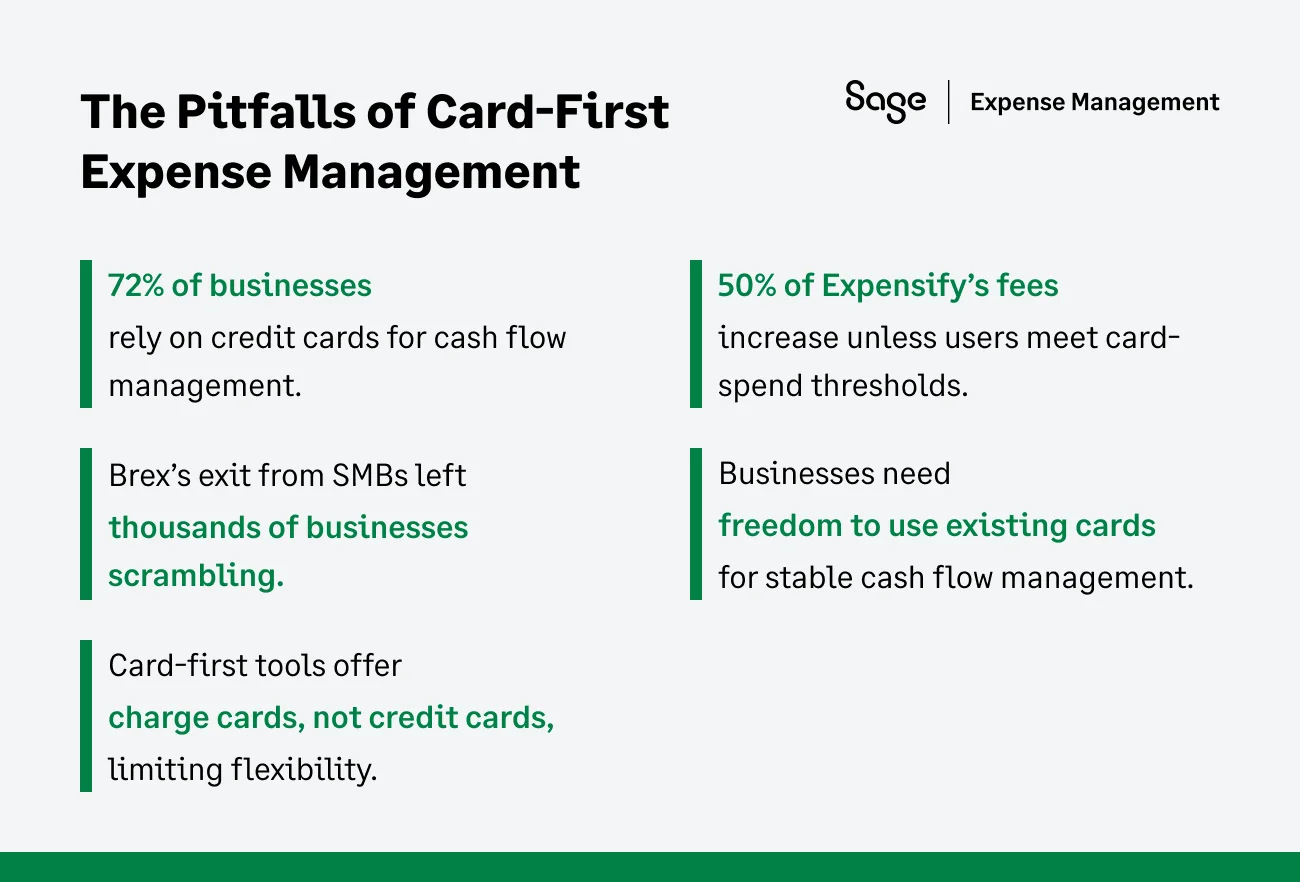
Why Card-First Models Don’t Work for Most Businesses
Charge cards, not credit cards
Ramp, Expensify, and other card-first expense tools offer charge cards, not credit cards, meaning balances must be paid off monthly–there’s no flexibility in managing cash flow.
Exclusionary underwriting criteria
Ramp and Expensify favor VC-based startups or cash-rich businesses, leaving most small businesses without access to their cards.
Unsustainable business models
These platforms rely on interchange fees–a risky revenue stream that can collapse as interest rates rise and rewards programs become unsustainable.
Why Banks Hold an Advantage
Banks still hold the upper hand since they’ve basically perfected the whole process. They have access to cheap capital and time-tested underwriting methods, leaving card-first fintechs scrambling to compete.
Long-Term capital & Rolling credit
Several expense management platform cards are charge cards. This is a major technical difference that affects your balance sheet. On a charge card, the full balance is due every 30 days (or even every week). If you miss the payment by one day, your cards are blocked.
Traditional bank cards offer revolving credit. This means you can choose to pay the minimum amount required and carry the rest to the next month. While there is an interest cost, it acts as a low-cost emergency loan.
For businesses that buy inventory upfront and get paid 60 days later, a charge card is not of much use. A revolving bank card at least allows you to bridge that 30-day gap without taking out a separate high-interest business loan.
Relationship banking
Banks use people to make decisions. They look at your whole history and future plans. A bank manager can help if your cash flow dips for a good reason. Card- first expense management platforms often lack this human touch.
- Manual overrides: A bank manager can perform a manual override to increase a limit for a one-time large purchase. Automated algorithms usually cannot be overridden by customer support staff.
- Holistic review: Banks look at your total relationship. They see your personal accounts, your business savings, and your equipment loans. Card-first expense management platforms only see the cash in the accounts you link to them.
- Support tiers: Most automated expense management support is ticket based. You wait 24 to 48 hours for an email. Relationship banks provide a direct phone number to a person who knows your business name and history.
How Sage Expense Management (Formerly Fyle) Offers True Freedom Without the Hassle
At Sage Expense Management, we believe the best business cards are the ones you already have. You shouldn't have to choose between great tech and great banking.
Real-Time feeds on any credit card
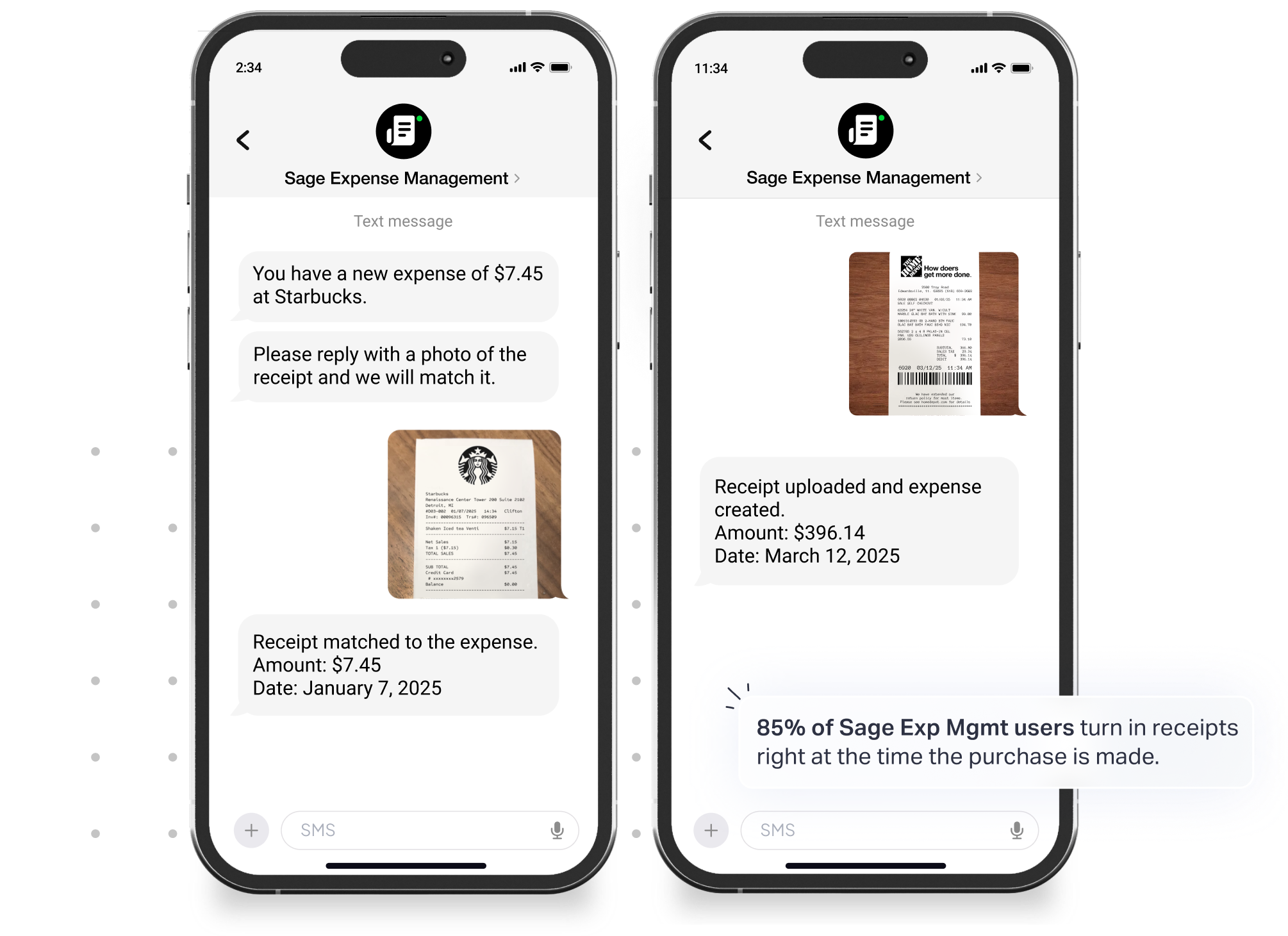
Sage Expense Management integrates with all major credit card networks thus there is no need to change cards or abandon trusted banks, and existing bank relationships, rewards, etc.
How does this work? Well, users get text notifications the moment their card is swiped, prompting them to upload receipts instantly. The employees just need to snap a photo and text it to us; our automated expense management system handles the rest.
Receipt collection and Reconciliation – Simple and Seamless
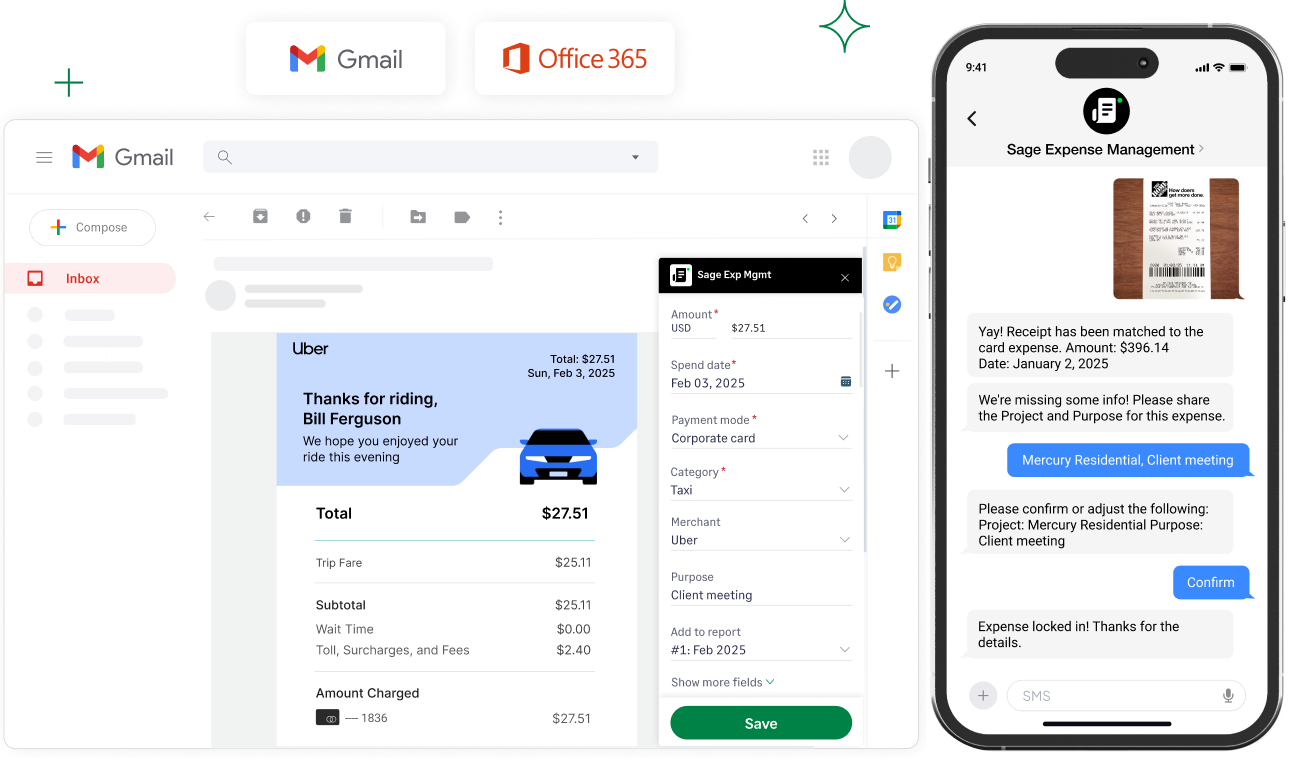
- Text receipts instantly: Employees can text their receipts directly to us for both credit card transactions and reimbursements with no app login required.
- Automated matching: We automatically match receipts to card transactions, reducing manual intervention.
How does this help?
- 5x faster receipt collection compared to traditional methods.
- Reduces back-and-forth by 48%, streamlining communication and follow-ups.
- Ensures error-free reconciliation by eliminating the need for month-end statement matching.
Seamless integrations with accounting tools
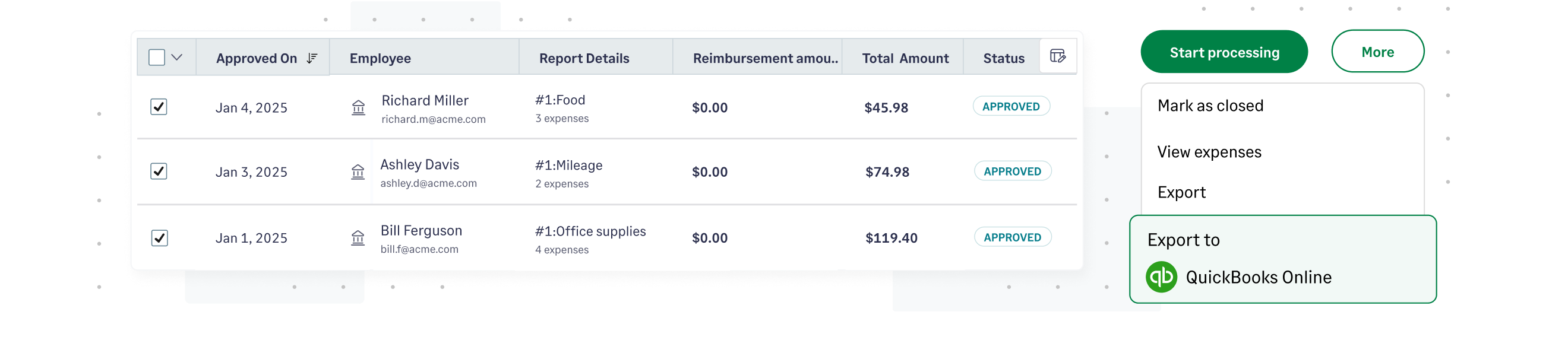
By providing granular, no-code integrations with popular accounting software's such as Quickbooks, Sage Intacct, etc. Sage Expense Management automatically imports key data such as GL codes, categories, cost codes, projects, and departments directly from your accounting software.
Expenses are exported instantly as bills, journal entries, or credit card charges, ensuring up-to-date books with minimal effort.
Self-serve, no-code integration with QuickBooks takes only 12.6 minutes on average.
Transparent pricing and Stellar support
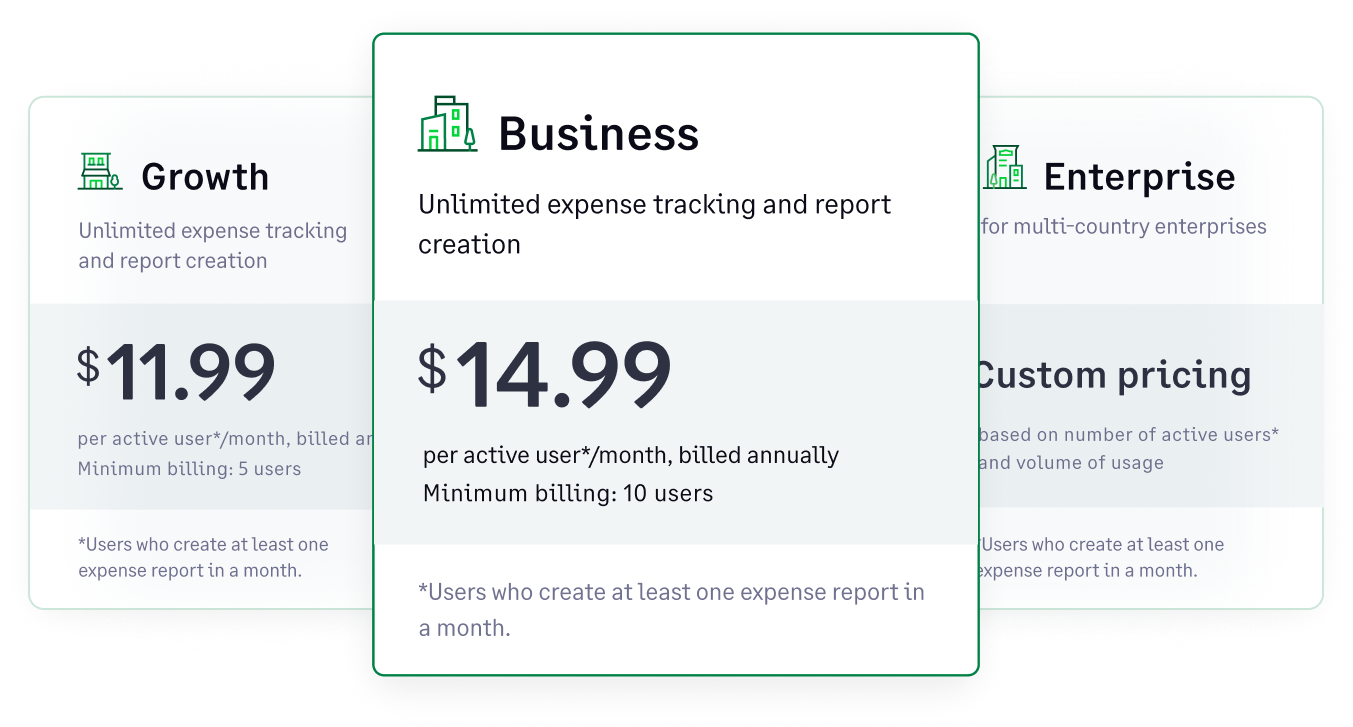
Pay only for active users
No "50% spend" requirements or hidden fees. You only pay for users who actually report an expense something that month.

24/7 Customer support
A 95% CSAT rating with response times under 30 minutes. When you have a problem, you talk to a human, not a Concierge Bot.
Why Settle for Less?
Whether it’s Ramp’s insatiable credit limits or Expensify’s poor support and hidden fees, these tools force businesses into rigid systems that often do more harm than good.
So, why compromise your financial freedom? With Sage Expense Management, you get real-time visibility, effortless reconciliation, and the flexibility to use any card you want, all with the best customer support in the industry.
{{rve="/cta-banners"}}


.jpg)