.webp)
Let’s face it: expense receipts aren’t exactly the most exciting part of business life. But those slips of paper (or digital records these days) are the keys to the kingdom. They are the only thing standing between you and a denied reimbursement or a painful tax bill.
Whether you're a seasoned entrepreneur or a new freelancer, this blog is your one-stop shop for understanding how to handle receipts like a pro.
What Is an Expense Receipt?
An expense receipt is essentially a legal document that proves you spent money for work. It’s the who, what, when, and where of a transaction. Think of it as a tiny superhero for your taxes, helping you fight for every reimbursement claim and deduction you deserve.
Digital vs. Physical receipts
In 2026, the IRS doesn't just accept digital receipts—they often prefer them. Under Revenue Procedure 97-22, a digital scan or photo of a receipt is legally identical to the paper original, provided it is legible and easily retrievable.
- Physical: Bulky, prone to fading, and easily lost.
- Digital: Searchable, permanent, and audit-proof because they don't turn into a blank piece of paper in a hot truck.
Why expense receipts matter?
Your receipts are the easiest way to turn a cost into an asset. By documenting expenses, you ensure:
- Fast reimbursement: Proof you actually spent personal money so your company can pay you back.
- Tax savings: The IRS allows you to deduct legitimate business expenses from your taxable income, lowering your overall tax bill.
The cost of misplaced evidence
A missing receipt is more than a $20 annoyance. For a finance team, a single missing receipt can trigger a broader audit of an entire month's expenses. If you can't prove a purchase was for business, the IRS can reclassify that reimbursement as taxable income, meaning you (or your employee) end up paying taxes on money that was supposed to be a repayment.
Also Read:
What Kind of Expense Receipt Is Accepted as a Valid Proof of Purchase?
The itemization test
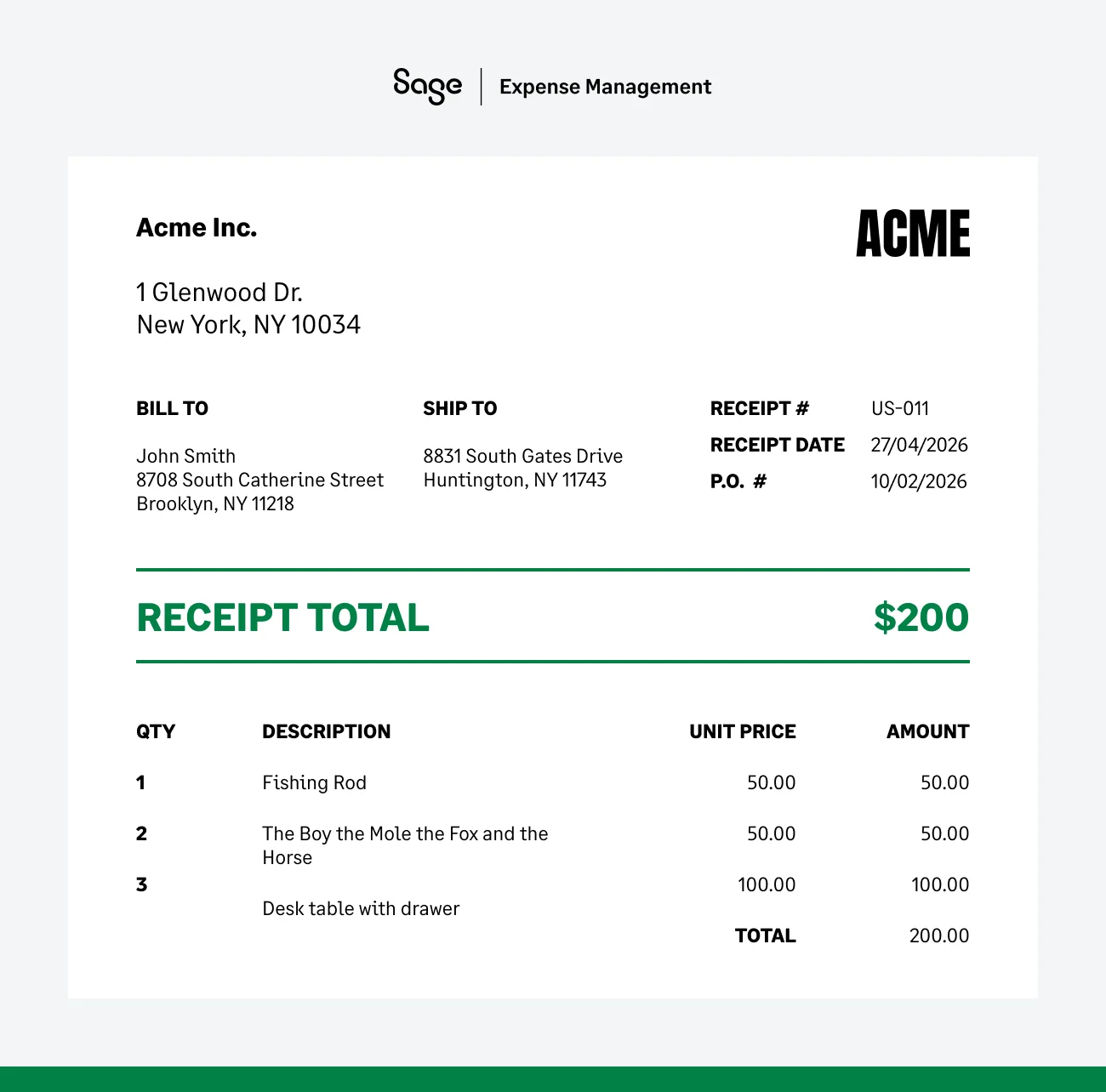
This is the #1 mistake businesses make. A credit card slip (the one with the tip line) is usually not a valid receipt in the eyes of the IRS. Why? Because it only shows the total.
- The total: $85.00 at a restaurant.
- The itemization: 2 steaks, 1 salad, and 3 bottles of expensive wine. The IRS needs the itemization to ensure you didn't buy something personal (like that wine) on the company dime.
Essential data points for a receipt
To be audit-ready, every receipt must show:
- Merchant name (Who did you pay?)
- Date of transaction (When did it happen?)
- Amount paid (How much was it?)
- Description of goods (What did you actually get?)
What Are Adequate Records For The IRS?

Here are a general set of guidelines to follow when keeping expense records:
1. Keep it organized
For your business expenses, you'll need to maintain detailed records. This can be done in an account book, diary, log, or any system that tracks your spending.
2. Receipts are key
On top of your records, you'll also need to back them up with proof of purchase. This usually comes in the form of receipts, canceled checks, or bills. These documents should show the amount spent, date, location, and what the expense was for.
3. Time is money (For records)
The IRS uses the term contemporaneous. This means you should record the details of an expense while the memory is fresh. A note written 6 months later is far less credible during an audit than a note written the same day.
4. Explain when needed
If you buy a laptop, the business purpose is obvious. If you buy a $200 dinner, you need a note explaining who was there and what business was discussed.
Common IRS FAQ's for expense receipts
1. How long should you keep your receipts?
The IRS recommends keeping receipts for at least three years after you file your return. However, many experts suggest a seven-year rule if you want to be completely safe, especially for large equipment purchases or in cases where income might have been underreported.
2. Does the IRS require receipts for expenses under $75?

No, the IRS typically does not require a physical receipt for business expenses under $75. This is part of the de minimis record-keeping rule designed to save small businesses from drowning in paperwork for tiny purchases.
However, there is a massive trap in this rule that often trips up employers during an audit: Lodging.
- The lodging exception you need to know
While you might get a pass on a $60 dinner or a $40 taxi ride, the rules change the moment you check into a hotel.
- Non-lodging (Meals, Supplies, Taxis): For these, no receipt is strictly required under $75. You still need to log the date, place, and business purpose, but you won't be penalized for losing the slip of paper.
- Lodging: You must have a receipt for every hotel stay, regardless of the amount. Even if you found a budget roadside motel for $50, the IRS mandates a formal receipt.
- Why is the IRS so strict here?
It's a preventative measure. It is much easier for someone to invent a $50 hotel stay than it is to fake a $50 lunch. By requiring a lodging receipt, the IRS ensures the travel actually took place.
3. I’m being audited, what if I don’t have receipts?
Nobody enjoys getting audited by the IRS. But if it happens to you, the lack of proper records (including receipts) can make things much more stressful.
Imagine this: you deducted office supplies but can't locate the receipts for those printer cartridges and sticky notes. Here are some steps to take:
- Reconstruct your records: Use bank statements and credit card transactions to recreate your expenses for the year. Categorize them by office supplies, travel, marketing, etc. This can be a time-consuming process, but it's better than facing an audit unprepared.
- The Cohan Rule: The IRS understands that sometimes receipts get lost. Businesses have some wiggle room under the Cohan Rule (based on a tax court case). Even without receipts, you might be able to convince the IRS of legitimate expenses based on past spending patterns and business justifications. However, this isn't a guaranteed get-out-of-jail-free card. For example, if you spend around $500 a month on office supplies based on past records, the IRS is more likely to accept your explanation for a missing receipt for a similar amount, even without the actual paper slip.
- Prevention is key: The best defense against an audit nightmare is good record-keeping from the outset. Here's how to be proactive:
- Embrace digital receipts: Many vendors offer digital receipts via email or online portals. Store them securely for easy access.
- Develop a system: Create a clear system for collecting and organizing receipts. Whether it's a designated folder or a digital app, ensure your receipts are easily accessible.
- Invest in Receipt Management Software: Tools like Sage Expense Management can scan, categorize, and store your receipts electronically, automating the entire process and saving you time and frustration.
How Sage Expense Management Can Help with Expense Receipt Management
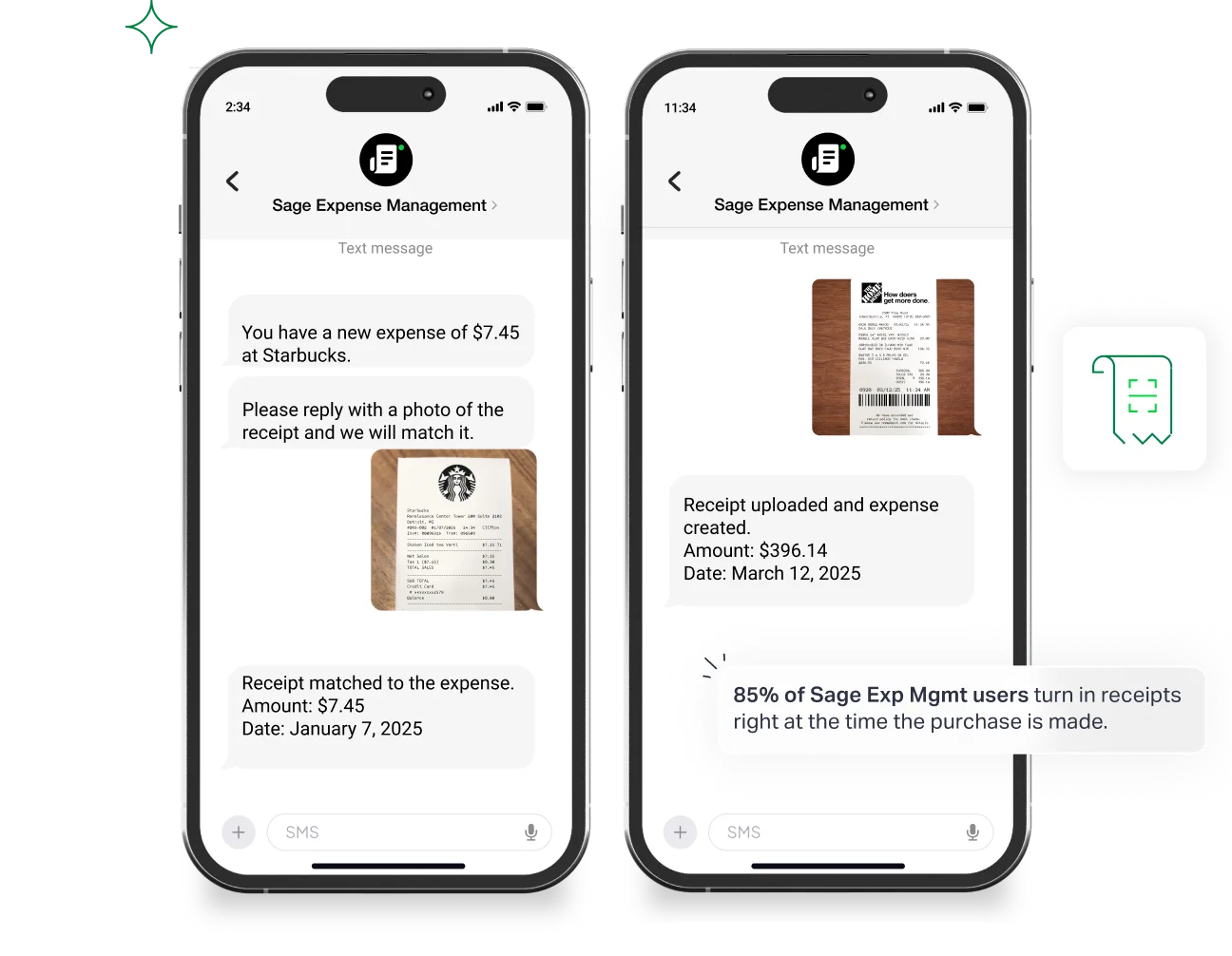
Managing a mountain of receipts can be a nightmare. But with a handy receipt management tool like Sage Expense Management that can scan, categorize, and store your receipts electronically you can spend your time doing what matters most–growing your business. Here’s how we can help:
- Say goodbye to paper piles: Sage Expense Management lets you ditch the paper receipts. You can submit them via text message, through our mobile app, or even our email plugins for Gmail and Outlook. We will take care of the rest!
- Automated categorization: No more manually sorting receipts into categories like "travel" or "office supplies." Sage Expense Management's clever AI can automatically read and categorize your receipts based on their information.
- Smart matching: Automatically match your receipts to their corresponding credit card transactions, saving you the hassle of manually pairing them up.
- Effortless expense reporting: With all your receipts organized and categorized, creating expense reports becomes a breeze. Sage Expense Management streamlines the process, letting you focus on more important things.
{{chasing-receipts="/cta-banners"}}